A made-to-measure TV unit for a media wall
Media walls were one of the most searched home DIY projects of 2025, and the part of one that actually does any work is the low cabinet under the screen. It holds the consoles, swallows the cables and decides whether the whole wall looks built in or bought. Here is how to size one to the television and the room, lay out drawers and an open bay for the kit, and get it cut from a list rather than a showroom.
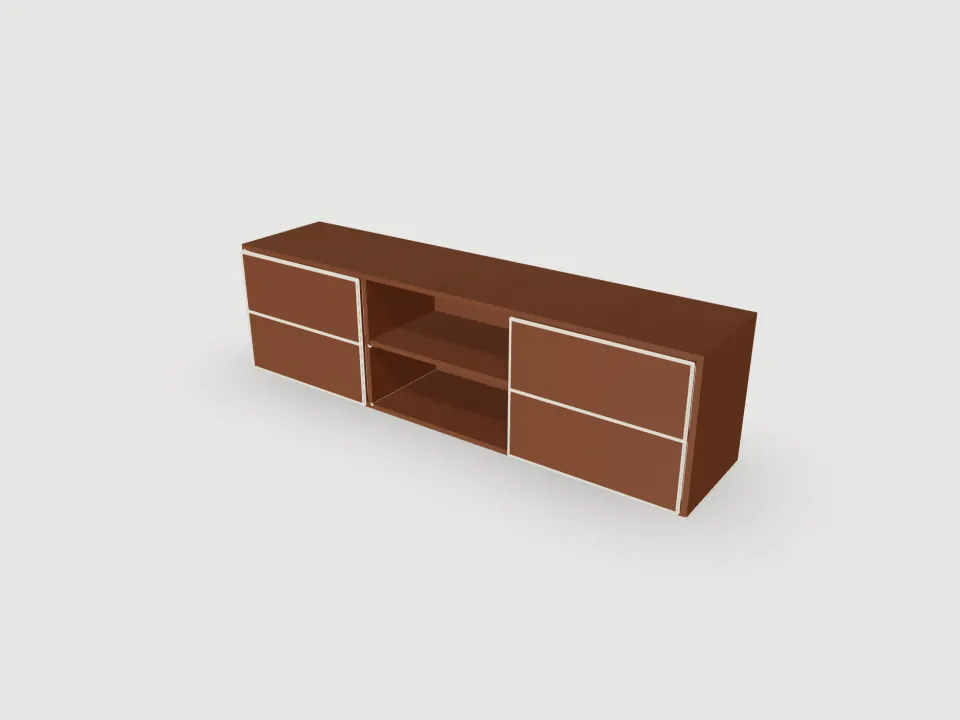
The wall, and the unit under it
A media wall is usually two jobs that get talked about as one. The first is the wall itself: a timber or metal stud frame built out from the existing wall, boarded with plasterboard or MDF, with a recess for the screen, often a slot for an electric fire, and cables run inside it. The second is the storage: a long, low cabinet across the bottom, and sometimes tall cupboards or shelves either side.
This guide is about the second job, and it is worth being plain about where the line falls. Sizewood designs the cabinet: a flatpack carcass in sheet material, with drawers, doors, shelves and a cable hole, priced live and exported as a cutting list and a CNC drawing. It does not model the stud frame, the plasterboard, the fire insert, the TV bracket or any lighting. If you are building the whole wall, you will frame and board it the usual way, and drop a cabinet from here into the space you leave for it, or stand it in front.
That split also happens to be the sensible order of work. The cabinet has fixed sizes the moment it is cut; plasterboard can be packed out by a few millimetres. Design the unit first, then frame the wall around it.
How wide: start from the screen
Televisions are sold by their diagonal in inches, which tells you almost nothing about how much wall they take. For a 16:9 panel the width is about 0.87 of the diagonal and the height about 0.49, so the glass alone is roughly:
- 55 inch: about 1220mm wide, 680mm tall.
- 65 inch: about 1440mm wide, 810mm tall.
- 75 inch: about 1660mm wide, 930mm tall.
- 85 inch: about 1880mm wide, 1060mm tall.
Add a little for the bezel and check the maker's spec sheet before you commit. The usual rule of thumb is that the unit should be at least as wide as the screen and looks best noticeably wider, so the television reads as sitting on something rather than balancing on it. Design for the next television as well as this one: screens only get bigger, and a cabinet is harder to replace than a TV.
The example here is 1800mm wide, which comfortably clears a 65 inch screen and is about as wide as a 75 inch one needs. Sizewood takes any width from 300mm to 6000mm, so if the cabinet is to run wall to wall across a chimney breast or the full width of a media wall, it can.
Bays, and the 900mm limit
A long low unit is a row of bays separated by full-depth dividers. How many it needs is not a matter of taste. An 18–19mm shelf sags visibly past about 800mm under load, and 900mm is the practical limit without a support in the middle. A soundbar, a receiver and a stack of games is a real load, so the configurator enforces it: it warns above 800mm of clear bay width on any bay with a shelf, and if a bay would pass 900mm it adds a divider rather than let you order one that bows.
The example is three bays in 19mm board: 1800mm less two sides and two dividers leaves 1724mm, split 575 / 575 / 574mm. Widen it to 2400mm and the three bays grow to 775mm, still inside both limits. Take it to 2700mm and the middle shelf, at 875mm, gets the sag warning; add a fourth bay and it goes away. Up to twelve bays are allowed, and each can be open, shelved, doored or a drawer bank.
Height, depth and what goes inside
Height is set by where the screen goes. The common guidance is to put the middle of the screen near seated eye level, which for most sofas is somewhere around a metre off the floor. A wall-mounted 65 inch screen centred at about 1050mm has its bottom edge near 650mm, so a cabinet of 500mm leaves a clear band of wall between the two, which is what makes a media wall look composed. If the screen stands on the unit instead, the unit top is the screen's base, and a lower cabinet keeps it from sitting too high.
Depth is set by the kit. The example is 400mm deep overall, but the back sits in a groove 16mm in from the rear edge and is itself 19mm thick, so 365mm is usable in front of it. The middle shelf is cut 2mm short of that, at 573 × 363mm. That clears a games console on its side or flat, and most AV receivers, but measure yours with the plugs in: a cable sticking out of the back of a box adds 50mm or more. The configurator accepts depths from 150mm to 600mm.
The open middle bay has a clear opening 462mm high (500mm less the top and bottom). Its one shelf sits with its underside 224mm above the bay floor, on the 32mm hole grid, which leaves about 220mm above and below: two decks, one for the console and one for the box or the router. The shelf rests on pins, and the holes are bored three 32mm steps either side of it, so it can move 96mm up or down without drilling the dividers full height.
Drawers either side
Controllers, remotes, spare cables and the box the soundbar came in are the reason a TV unit wants drawers rather than open shelves at each end. In the example, each end bay is a bank of two drawers. The bay's opening is split equally, and each drawer has a 19mm overlay front with a 3mm gap all round, banded on all four edges, and a box behind it.
- Fronts: 228 × 572mm, with a Ø5mm handle hole bored 70% of the way up the front.
- Box: 345mm deep and 180mm tall, sides and back in the carcass board. The box is 20mm shorter than the usable depth so it clears the back, and capped at 180mm tall however deep the drawer.
- Base: 6mm HDF, slid into a groove 10mm up from the bottom of the sides and back and 8mm deep.
- Runners: the box is 13mm narrower each side than the bay, which is a typical clearance for side-mounted ball-bearing runners. Check it against the runners you buy. A pair per drawer is in the price.
A drawer bank fills its whole bay, so a bay with drawers has no shelf. If you would rather have doors at the ends, set those bays to a left- or right-hung door: Sizewood bores two 35mm hinge cups on a door this short. What it does not model is a drop-down flap, a lift-up door or push-to-open fronts, so if the look you want is handleless, plan on push latches of your own and leave the handle holes out of the order.
Cables and air
The tidy look of a media wall depends on cables disappearing, and the cabinet is where they have to go. The example's middle bay has a Ø80mm cable hole bored through the back, centred on the bay and 100mm below the top of the back panel. That is the size of a standard desk grommet, large enough to pass a mains plug through, and high enough to line up with a socket or a cable run behind the unit. Any bay can have one, but only on a unit with a back panel: without a back there is nothing to bore.
It is a bore rather than a cut-out on purpose, so the back can still be cut on a panel saw and the hole made with a hole saw if your workshop is not a CNC shop. Sizewood does not add ventilation slots or a cable trunking channel. Electronics give off heat, which is why the example keeps the kit in an open bay rather than behind doors; if you close it in, the usual advice is to leave an air path behind or above the equipment.
On the floor, on a plinth, or floating
The example sits straight on the floor with no plinth, which keeps it as low as possible. A plinth is the other option: anything from 70mm to 150mm, set back 50mm from the front as a toe recess. The shadow under that recess is what gives a floor-standing unit the floating look people are after, and the plinth is the part you pack level on an uneven floor.
A truly wall-hung unit is a different thing, and Sizewood does not model it: there is no hanging rail, cleat or bracket in the design, and it does not work out whether your wall will carry a cabinet full of drawers. If you hang one, the conventional way is a hanging rail or heavy-duty concealed brackets fixed into masonry or into studs that were planned for it. A media wall's stud frame was usually built to hold plasterboard and a TV bracket, not a loaded cabinet, so add timber where the fixings will go before the wall is boarded.
Fitting it into a media wall recess
If the unit is going into a slot in the wall rather than standing in front of it, treat the slot like an alcove. Measure its width at the back and the front, top and bottom, and design to the smallest figure less a fitting gap of around 10mm, so the carcass slides in without binding. The configurator draws a rectangular carcass to the sizes you give it and does not add scribe allowances or filler strips, so close any gap with a strip cut on the day. Our alcove shelving guide covers measuring and scribing in detail, and the same method works for the tall towers some media walls have either side of the screen.
If you are framing the wall yourself, the easier route is the reverse: have the cabinet made, stand it in place, and build the stud frame to it. Plasterboard forgives a few millimetres; a cut carcass does not.
Board and what it costs
The example is cut from H3303 ST10, a Tossini Elm woodgrain on 19mm chipboard, with the drawer bases in 6mm HDF. It is 28 parts. Every visible front edge is banded in 2mm ABS, and the drawer fronts on all four edges, which comes to 10.5m of banding. At the cut-to-size rates the designer quotes from:
- Board, £225.50: two whole 2800 × 2070mm sheets of the elm at £104.75, and one 2440 × 1220mm sheet of HDF.
- Cutting, £90.20: the 40% the service adds to the board to cut it to size.
- Edge banding, £19.48: 10.53m at £1.85 a metre.
- Machining, £27.26: grooves by the metre, holes by the hole.
- Hardware, £34.68: cam-and-dowel fixing sets for the carcass joints, and four pairs of drawer runners.
That is £397.12 before VAT, or £476.55 with it. The board choice moves it more than anything else. A woodgrain is grain-locked, so every part has to lie the same way on the sheet; in Premium White, a plain decor whose parts can be turned to fit, the same unit nests onto one sheet instead of two and comes to £256.59 with VAT. Widening the elm version to 2400mm takes it to three sheets and £661.84. Handles, wall fixings and anything electrical are not in any of these.
From sizes to a cutting list and a DXF
Open the example below and change the width, height and depth to yours, set how many bays you want and what each one holds, and turn the cable hole on where the socket is. The 3D view, the panel list and the price all update together, because they all read the same set of panels.
What you take to a workshop is a cutting list as XLSX or CSV, one row per part size with decor, thickness, length, width, quantity, description and the banding on each edge, and a nested DXF with every sheet laid out. The two belong together. A cutting list has no column for machining, so the drilling and grooving are not in it: on the example that is 61 holes (the shelf pins, four handle holes and the cable hole) and 16 grooves (the back and the drawer bases). The DXF carries them on their own layers, cuts on one, grooves on another, holes on a third, so a CNC can run it or a panel shop can see what to machine.
Two kinds of hole are not in the drawing: the cam-and-dowel bores for the carcass joints and the screw holes for the drawer runners. The fixings are in the quote, but their positions depend on the hardware you end up with, so mark them off the fittings at assembly.
Assembly
- 1. Lay the carcass parts out on a blanket and check them against the cutting list before anything is drilled.
- 2. Fit the runners to the sides and dividers while they are flat: it is far easier than reaching into a bay.
- 3. Join the sides to the bottom, slide the back down its grooves, fit the dividers against it, then the top.
- 4. Build the drawer boxes: sides and back, the HDF base slid into its grooves, then the front, and fit the runners.
- 5. Stand the unit in place, check it is level, and feed the cables through the hole before the kit goes in.
- 6. Put in the shelf pins and shelf, hang the drawers, and adjust the fronts so the 3mm gaps run even.
A low, deep unit is stable on its own, but a television standing on top of it is not: strap the screen to the wall, or mount it there, so a pulled drawer or a curious child cannot bring it down.
- Size
- 1800 × 500 × 400
- Board
- H3303 ST10 19mm
- Fronts
- 4 drawers
- Units
- Millimetres